
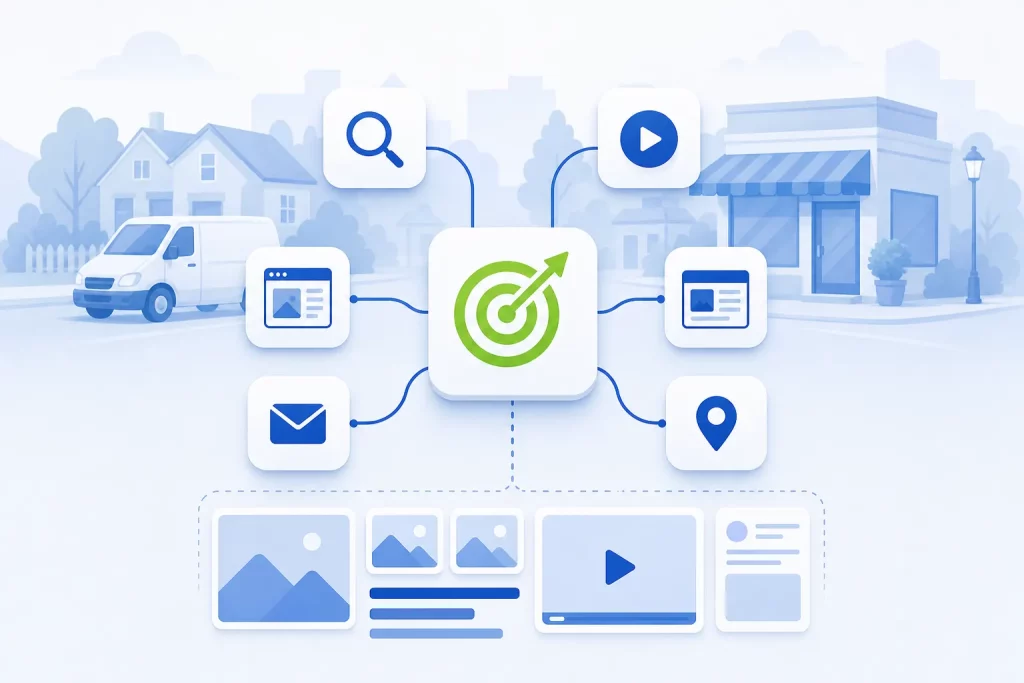
Performance Max is a Google Ads campaign type that runs your ads across all of Google’s ad inventory, including Search, YouTube, Display, Discover, Gmail and Maps, from a single campaign. You give it conversion goals, a budget, creative assets and optional audience signals, and Google’s AI decides where, when and to whom to show your ads. For a local business it can work well, but only when conversion tracking is accurate and the assets are good, and it usually runs alongside a Search campaign rather than replacing one.
This guide explains how Performance Max (often shortened to PMax) works, the settings that matter most for a local business, what you can see in the reports, and when a Search campaign or Local Services Ads is the better choice. For our full approach to paid search, see our Google Ads management page.
How Performance Max Works
Google describes Performance Max as a goal-based campaign type. The assets and settings you provide are combined with Google AI to serve across all available inventory and optimize toward your goals. Google recommends it when you have specific conversion goals, such as generating leads, and want to reach people across all of its channels from one campaign. You can create one with the Sales, Leads, Website traffic or Local store visits and promotions objectives, or without a goal’s guidance.
| What you provide | What Google’s system does with it |
|---|---|
| Conversion goals, with an optional CPA or ROAS target | Uses Smart Bidding to bid in each auction based on how likely a conversion is |
| Text, images, logos and videos | Mixes and matches your assets into ads for each channel |
| Audience signals | Uses them as a starting point to speed up learning |
| Budget and brand safety settings, such as brand exclusions | Moves budget toward the inventory and placements that perform best |
How Performance Max and Search Campaigns Work Together
Google positions Performance Max as a complement to keyword-based Search campaigns. When a search exactly matches an exact match keyword in one of your Search campaigns, Google says the Search campaign is prioritized over Performance Max. Search themes, which you can add to a PMax campaign to guide it toward certain searches, carry the same priority as phrase and broad match keywords. So your Search campaign keeps the searches you’ve defined most tightly, and PMax picks up much of the rest. Google’s help page also now describes channel priority settings, which let you give Search partners and the Display Network their own priority tiers.
Asset Groups
Google defines an asset group as a collection of creatives centered on a theme or a target audience. Any asset in the group can be combined with any other to build ads for Google Search, Google Maps, Display, YouTube, Gmail, Discover and Google partner sites. You can have several asset groups in one campaign, and Google suggests basing them on the sections, categories or themes on your website.
For a local business, that usually means one asset group per main service line, each with its own final URL. An HVAC company might have one for AC repair, one for furnace installation and one for maintenance plans. Each group then gets headlines, images and videos that match that service instead of one generic set.
Assets That Work for Local Businesses
- Real photos of your team, vehicles, finished jobs and storefront. Stock photos look like everyone else’s ads.
- A short video of your own. Google can generate videos from your assets when auto-generated videos are turned on, but a simple phone video of your crew or a customer walk-through will say more about your business.
- Specific headlines that name the service, the area you serve and the reason to call.
- A review of generated text. With text customization on, Google writes extra headlines and descriptions from your landing pages, domain and existing ads. Check them regularly so nothing promises a service or a price you don’t offer.
Audience Signals: Suggestions, Not Targeting
This is the most misunderstood part of Performance Max. Google calls audience signals “audience suggestions” that help its AI optimize, and they’re optional. Google is explicit that Performance Max may show ads to relevant audiences outside your signals if they have a strong likelihood of converting. A signal tells the system where to start looking. It doesn’t fence anyone in or out.
You add signals in the Audiences section under each asset group. Google lists these inputs:
- Your data: website visitor lists, app user lists, customer lists such as email lists, and video viewer lists.
- Custom segments built from keywords, URLs of similar websites, or apps your ideal customer uses. Google specifically suggests search term based custom segments.
- Demographics to narrow the focus of a custom segment.
- Additional segments based on people’s interests and other details.
For a local service business, a customer list and a custom segment built from the searches your best customers make are usually the most useful signals.
Final URL Expansion
Google’s help page on Final URL expansion says it’s turned on by default for Performance Max campaigns. It lets the campaign replace your final URL with what it judges to be a more relevant page on the same domain, based on the person’s search intent. With text customization on, Google may also write a dynamic headline and description to match that page.
Google itself warns that this “can sometimes lead to ads pointing to unintended pages if not managed carefully with URL exclusions.” On a local business site, those unintended pages might be:
- Job listings and careers pages
- Old blog posts about topics you no longer focus on
- Pages for services you’ve stopped offering or areas you no longer serve
- Privacy, terms and thank-you pages
You have two options: turn the setting off in campaign settings, or keep it on and add URL exclusions for pages that shouldn’t receive ad traffic. Google notes that Final URL expansion isn’t supported for campaigns with store goals only. To see where expanded URLs sent people, check the Expanded Final URL assets tab in asset reporting.
Conversion Goals and Why Tracking Quality Matters
Performance Max optimizes toward the conversion actions you tell it to care about. Google’s overview says you define those actions and can add a CPA or ROAS target, and Smart Bidding bids based on how likely each auction is to produce one. That makes your conversion setup the single biggest factor in how PMax behaves.
If you count weak actions as conversions, PMax will find more of them. Common problems on local business accounts include:
- Counting a page view, a click on the contact page or a directions click as a lead
- Counting every call, including wrong numbers and calls lasting a few seconds
- Spam form submissions counted the same as real ones
- The same lead counted twice because two tags fire on one form
The fix is to set your primary conversion goals to real leads, such as qualified calls and genuine form submissions, and to keep softer actions as secondary so they’re reported but not used for bidding. Going further, Google’s enhanced conversions for leads lets you import which leads became customers, using hashed data like email addresses from your lead form, so bidding can learn from sales rather than form fills. Our guide to tracking ad performance for a service business covers the setup.
Brand Exclusions and Negative Keywords
Performance Max has fewer controls than a Search campaign, but it does have some. Google lists keywordless targeting, Final URL expansion, search themes, negative keywords and brand exclusions among its campaign-level controls.
Brand Exclusions
Google says brand exclusions keep your campaigns from serving for branded searches you want to avoid, and that for Performance Max they apply only to Search, Shopping and YouTube search inventory. Local businesses often use them to keep PMax off searches for their own business name, which a dedicated Search campaign can cover with more control, or off searches for other companies’ brands.
Negative Keywords
According to Google’s current help page on negative keywords in Performance Max, you can add negative keywords to a specific Performance Max campaign or apply them at the account level, where they cover all Search and Shopping inventory, including PMax. Google notes that Performance Max negative keywords apply to Search and Shopping inventory only, so they won’t stop your ads from showing on YouTube, Display or other channels. These controls have changed over time, so check Google’s current help page before you build a plan around them.
Good negatives for a local service business usually cover jobs and careers searches, do-it-yourself searches, free or cheap searches if you’re not the budget option, and services you don’t offer. Our guide to broad match vs exact match keywords explains how match types affect what you block.
Reporting: What You Can See in Performance Max
Limited visibility is one of the most common worries about Performance Max. Google’s help center documents several reports that help, and three matter most.
- The channel performance report sits under Insights and reports. Google says it gives a campaign-level performance summary, a chart of how channels contribute to your conversion goals, a channel distribution table you can download, and diagnostics that flag possible issues on different channels.
- The search terms report for Performance Max shows the searches that triggered your ads, including ones that didn’t convert, with segments for ad format and landing page. Google says data is available from March 2023 and suggests prioritizing conversion data over clicks and impressions when you judge the campaign. It’s also where you find candidates for negative keywords.
- Asset reporting shows how your headlines, images and videos perform, including the Expanded Final URL assets tab mentioned above.
Even with these reports, Performance Max makes most delivery decisions for you. Your job shifts from setting every detail to reviewing the reports, cleaning up inputs and steering with the controls you have.
When Performance Max Fits a Local Business, and When It Doesn’t
We don’t put every local business into Performance Max. Here’s how we usually think about the choice:
| Your situation | Usually the better starting point |
|---|---|
| Small budget, and you want calls from people searching for your service right now | A Search campaign with tightly chosen keywords |
| You’re a home service business in a category Local Services Ads supports and want to pay per lead | Local Services Ads |
| Conversion tracking isn’t set up, or counts weak actions | Fix tracking first, then decide |
| Reliable lead tracking, good photos and video, several services and room in the budget | Performance Max alongside a Search campaign |
| You want more walk-in visits to a physical location | Performance Max with the Local store visits and promotions objective |
Local Services Ads deserve a closer look for many home service businesses. Google’s Local Services Ads guide says leads come in as phone calls and messages through your ad, that you pay only for leads related to your business and services, and that eligible businesses in select categories can earn the Google Verified badge. Our guide to Local Services Ads (home service ads) explains how they work. A sensible order for many home service businesses is Local Services Ads and a Search campaign first, then a Performance Max test once tracking is solid.
If you’re deciding between Google and Meta altogether, our comparison of Google Ads vs Meta Ads for local service businesses covers that choice, and our guides to Facebook lead ads and what Facebook ads cost cover the Meta side. For budgeting on Google, see what to budget for Google Ads campaigns.
Common Performance Max Mistakes
- Launching without real conversion tracking. PMax optimizes toward whatever you count, good or bad.
- Using one asset group for every service. Ads end up generic and land on the home page.
- Leaving Final URL expansion on without exclusions. Ad traffic drifts to blog posts and careers pages.
- No brand exclusions. PMax can end up taking credit for people who were already searching for your name.
- Judging it in the first few days. Like other Smart Bidding campaigns, it needs time and conversion data to settle.
Frequently Asked Questions
Is Performance Max good for local businesses?
It can be, when conversion tracking is accurate, the budget leaves room for the system to learn, and you have good photos, video and service pages. For a small budget or a business that mostly needs calls from people searching right now, a Search campaign or Local Services Ads is often a better start.
Does Performance Max replace Search campaigns?
No. Google positions it as a complement to keyword-based Search campaigns. When a search exactly matches an exact match keyword in a Search campaign, Google prioritizes the Search campaign over Performance Max.
Can I add negative keywords to Performance Max?
Yes. Google’s current help page says you can add negative keywords to a specific Performance Max campaign or at the account level. They apply to Search and Shopping inventory only, not to YouTube, Display or other channels.
Are audience signals the same as targeting?
No. Google describes audience signals as optional suggestions that help its AI optimize, and says Performance Max may show ads to people outside your signals if they’re likely to convert.
Can I see where my Performance Max ads ran?
Partly. The channel performance report shows how Search, YouTube, Display and other channels contribute to your conversions, and the search terms report shows which searches triggered your ads. Google still makes most delivery decisions for you.
Should I use Performance Max or Local Services Ads?
If you’re a home service business in a supported category, Local Services Ads are often the simpler start because you pay for leads rather than clicks. Performance Max makes more sense once you have reliable lead tracking and want to reach people beyond the Local Services ad unit.
Get Help With Performance Max and Google Ads
Local Blitz has run digital marketing for local businesses since 2009, from offices in San Diego (Encinitas) and Indianapolis. We set up conversion tracking first, then choose between Search, Local Services Ads and Performance Max based on your market and budget, and we report on calls and leads. You pay Google directly for ad spend, and our management fee is separate. Plans are month-to-month, with no cookie-cutter packages. See our Google Ads management service or book a free strategy call. If PMax isn’t right for your business, we’ll tell you.
Is AI recommending your business?
We will ask ChatGPT, Gemini and Google AI about your business and show you what they say. It is free.
Want More Customers From Search?
Book a free strategy call, or call San Diego (858) 225-6877 or Indianapolis (317) 672-1156.